
FAQ
Q: Can I use load cells from other manufacturers?
Strain gauge-type load cells.
*Please note that some load cells may not be compatible, so please contact us in advance.
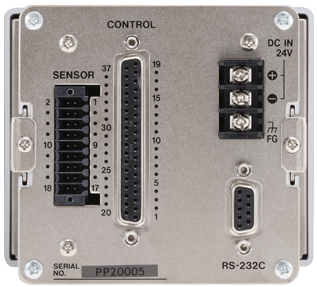
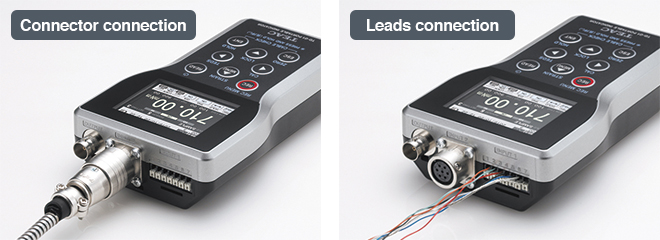
Q: How do I connect the sensor?
[TD-9000T] Leads connection
[TD-700T] Leads connection
[TD-260T] Leads connection
[TD-SC1] Leads connection
[TD-01P] Round connector,Leads connection
Q: Can signals other than load cell signals be input? [TD-9000T]
Adapting 2 inputs of Strain and Displacement (Voltage and Pulse)
Support for pulse input (A/B phase or A phase, differential square wave (RS-422 conformance) and voltage input ±5.2 V. Not only Time-Load but also Displacement-Load management is possible.
Q: What is the signal input range?
[TD-9000T] ±3.2mV/V
[TD-700T] ±3.2mV/V
[TD-260T] ±3.2mV/V
[TD-SC1] ±5mV/V
[TD-01P] ±5mV/V
Q: What should I do if an error message appears after connecting the load cell to the indicator?
[All models] Please check the displayed value on the static strain display.
[TD-9000T] You can verify this using the static strain display, wire break detection function, and I/O terminal check function.
[TD-01P] You can verify this using the wire break detection function
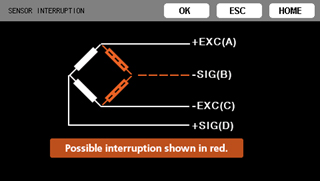
Q: What exactly is the wire break detection function? [TD-9000T] [TD-01]
The disconnection point of the load cell can be checked in real time. If the possibility of an interruption is detected, the location of the possible interruption will be shown in red.
Q: What is the calibration function?
There are three ways.[TD-9000T] [TD-700T] [TD-260T] [TD-SC1] [TD-01Portable]
[Actual Load Calibration] This calibration method measures the values of actual loads on the strain gauge transducer.
[Equivalent input calibration] This calibration method does not depend on actual loads.
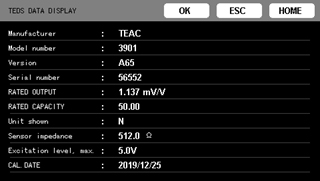
[TEDS calibration] This calibration method uses the strain gauge transducer rated output (mV/V) and rated capacity that are recorded in TEDS memory.
About Web page
https://loadcell.teac.com/support/teds.html
Q: Which indicators support automatic reading of TEDS sensors?
The following products are compatible.
When powered on, it automatically reads the data and calibrates itself.
Applicable models:TD-9000T, TD-700T, TD-260T, TD-SC1, TD-01Portable
https://loadcell.teac.com/support/teds.html
Q: If there is a power outage, should I repeat the calibration?
Since the indicator retains calibration data, it can be used without recalibration; however, in the event of a power outage, the display may show abnormal values due to issues with the load cell (such as overload or off-center loading).
Q: What is the sampling period for A/D conversion rate?
[TD-9000T] 24-bit, 5000 times/second, 25000times/second
[TD-700T] 24-bit, 4000 times per second, 20000 times per second (fast sampling mode)
[TD-260T] 100 times/sec
[TD-SC1] 24-bit, 20000 times/second
[TD-01P] 24bit, 1000 times/second
Q: Please tell me the types of display units.
[TD-9000T] loadcell: dN, N, kN, g, kg, ton, mN·m, N·m, kN·m, Pa, kPa, MPa, mBar, Bar, m/s2, Gal, mm, なし (default value:N)
Displacement sensor:μm, mm, cm, m, rad, deg, none default value:mm
[TD-700T] N, kN, kPa, MPa, g, kg, sht, ton, mN·m, N·m, kN·m, none
[TD-260T] Numerical values only
[TD-SC1] No display.
[TD-01P] dN, N, kN, lbf, klbf, g, kg, sht, ton, mN·m, N·m, kN·m, Pa, kPa, MPa, psi, mBar, Bar, m/s2, G, Gal, mm, μ st, none
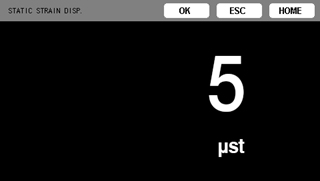
Q: What is static strain display?
Static strain refers to cases where the measured strain does not change over time or changes only gradually.
If this value is high, it is possible that the load cell's sensing element itself is undergoing plastic deformation or similar issues.
Applicable models: TD-9000T, TD-700T, TD-260T, TD-SC1, TD-01Portable
Q: What types of displays are available?
[TD-9000T] Japanese / English / Chinese / Korean
[TD-700T] Japanese / English
[TD-260T] Numeric display
[TD-SC1] No display*
[TD-01P] Japanese / English
*This can be configured using the TD-SC1 Setup software.
Q: Please specify the output interface.
TD-9000T: EtherNet/IP, CC-Link, D/A
TD-700T: CC-Link, RS-485, D/A
TD-260T: RS-232C
TD-SC1: EtherNet/IP, CC-Link, RS-485/ModbusRTU, D/A
TD-01P: D/A
Q: Can I save the measured data?
[TD-9000T] SD/SDHC Card (2GB - 32GB)
[TD-700T] Unavailable
[TD-260T] Can be saved to a PC (TD-View)
[TD-SC1] Unavailable
[TD-01P] Internal memory (can be saved to a PC via USB)
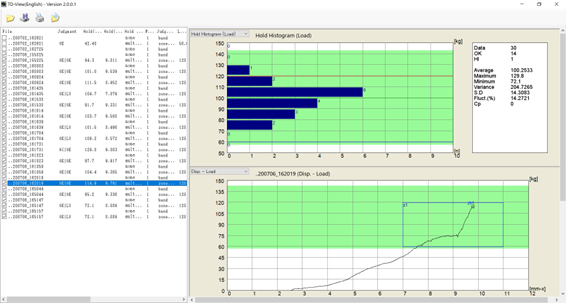
Q: Is there a tool for viewing the recorded data on a PC?
We are offering this application software free of charge.Please register as a user and download it.
Compatible models: TD-9000T, TD-01Portable
Q: [TD-9000T] What is the file format on the SD card?
The measurement results are saved in CSV format.
Q: What is the power source?
[TD-9000T] DC 24V (±10%) 13W, AC100-240V (AC adapter is optional)
[TD-700T] DC 12-24 V, 9 W,AC 100 V - 240 V, 50/60 Hz, 0.5 A
*AC adapter is included with the TD-700T for Japan and North America. No adapter is included for other regions.
[TD-260T] 100 to 240V ±10% 50 - 60Hz AC, 13W
[TD-SC1] 24V DC ±10% 7W
[TD-01P] 4 alkaline or NiMH AA batteries USB bus power (built-in Micro-USB B connector)
Q: Can it be operated by PC USB bus power?
[TD-9000T] Unavailable
[TD-700T] Unavailable
[TD-260T] Unavailable
[TD-SC1] Unavailable
[TD-01P] USB bus power (built-in Micro-USB B connector)
Q: I would like to obtain the 3D file data.
3D data for the TD-9000T, TD-700T, and TD-SC1 is available for download.
please contact us using the following form.
https://loadcell.teac.com/inquiry/
Q: What are the file formats for 3D data?
STEP file
Q: Please tell me which communication interfaces are available.
[TD-9000T] RS-232C, USB, EtherNet/IP*2, CC-Link*2
[TD-700T] CC-Link*2、RS-485*2
[TD-260T] BCD*2、RS-232C*2
[TD-SC1] RS-485, EtherNet/IP*計画中, CC-Link, USB*1, 3
[TD-01P] USB*1
*1: Separate software is required
*2: Option
*3: TD-SC1 Setup Software
Q: Can I purchase this product overseas?
Q: What safety certifications do you hold?
CE: [TD-9000T][TD-700T][TD-SC1][TD-01P]
UKCA: [TD-9000T][TD-700T][TD-SC1]
UL61010: [TD-9000T][TD-700T][TD-SC1]
Q: Have you obtained any environmental certifications?
[TD-9000T] RoHS
[TD-700T] RoHS
[TD-260T] RoHS
[TD-SC1] RoHS
[TD-01P] RoHS
*For inquiries regarding RoHS/REACH, please contact us using the form below.
https://loadcell.teac.com/contact.html
Q: Is there an English user manual?
The English user manual is available for download from the English section of our website.
https://loadcell.teac.com/support/downloads/
